
Keyzen Studio
Build Your Own Keyboard
Create your own custom keyboard by selecting each component step by step. Choose your keycaps, case, PCB, switches, and optional upgrades, then decide whether you want to build it yourself or have Keyzen Studio professionally assemble it for you.
Step 1 of 8 — Required
Choose Your PCB
The PCB is the core of the keyboard and controls functionality, layout support, lighting, and gaming features. Please select the PCB platform you would like to build around before selecting additional accessories.
Please select a PCB to continue.
Step 2 of 8 — Required
Choose Your Keycaps
Keycaps define the overall appearance and feel of your keyboard. This is the most visible part of your build and helps create your keyboard’s identity. Choose the style, color theme, and texture that best matches your setup.
Please select a keycap set to continue.
Step 3 of 8 — Optional
Choose Your Sub Keycaps
Add a supplemental accent keycap set to give your keyboard a more unique and personalized look. Choose one accent set below, or skip this step if you prefer to keep your primary keycap set as-is.
Only one Sub Keycap set can be selected.
Please select one accent keycap set and continue, or choose Skip Sub Keycaps.
Step 4 of 8 — Required
Choose Your Case
The case is the main body of the keyboard and determines much of the keyboard’s visual style and overall feel. Different materials and finishes can create very different sound and typing experiences.
Please select a case to continue.
Step 5 of 8 — Required for hollow cases
Choose Your Backboard / Weight
The backboard or weight enhances the keyboard’s stability, sound profile, and premium feel. Different materials and finishes create different visual and acoustic characteristics. A backboard is required for your selected hollow case.
A backboard is required for your selected hollow case. Please choose a backboard before continuing.
Step 6 of 8 — Required
Choose Your Switches
Switches determine the typing feel, sound profile, and gaming performance of your keyboard. Different switches provide different levels of smoothness, feedback, and responsiveness.
All switch selections include 65 switches per pack.
Please select switches to continue.
Step 7 of 8 — Optional
Upgrade Your Build
Performance Upgrade Kit — $35.00
Take your build beyond the standard configuration with our Performance Upgrade Kit. This coordinated upgrade replaces the plate, stabilizers, and internal sound-dampening materials together to improve typing feel, acoustics, and overall build quality.
Your selected Special Edition case requires a matched internal configuration. The case includes its own dedicated plate, which replaces both the original PCB plate and the standard FR4 upgrade plate.
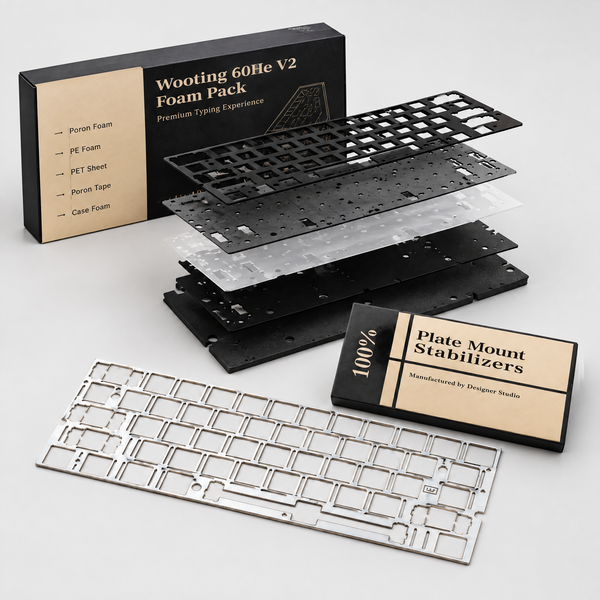
The upgraded components are designed to work together as a complete system. Because the upgraded plate uses a different configuration from the original setup, the plate, stabilizers, and foam are upgraded together to ensure proper fit and performance.
To complete the build, we will pair the case-specific plate with Designer Studio DS Adaptive PCB Mount Stabilizers and a PORON Foam Sound Dampening Kit. The additional price covers the stabilizers and foam; the plate is already included with your case.
FR4 Plate
A lightweight and responsive plate that provides a balanced typing feel with controlled flexibility and a clean acoustic profile.
Case-Specific Plate
Included with your selected Special Edition case. The compatible plate is determined by your case and is not charged again.
Designer Studio DS Adaptive PCB Mount Stabilizers
Upgraded PCB-mount stabilizers designed for smoother, more consistent large-key movement and reduced unwanted rattle.
PORON Foam Sound Dampening Kit
Internal PORON dampening material that helps reduce unwanted resonance and hollow case noise while creating a more controlled and refined keyboard sound.
WHY UPGRADE?YOUR MATCHED CONFIGURATION
- More refined and controlled keyboard acoustics
- Reduced unwanted resonance and hollow case noise
- Smoother and more consistent stabilized keys
- Improved typing feel and feedback
- A complete, compatibility-matched internal setup
Required for your selected Special Edition case
Configure the colors included in your complete kit, then select Continue to confirm.
Choose your stabilizer color, then select Continue to confirm the required upgrade.
Choose the complete kit and its colors, or keep the original setup.
Step 8 of 8 — Required
Choose Your Assembly Service
If you would like us to professionally assemble the keyboard for you, select the Assembly Service option. If not selected, your order will be shipped as individual parts for self-assembly.
Please choose an assembly option to continue.
Review Your Build
Check your selections below. Click “Add Full Build to Cart” when you’re ready.
Estimated Total
—
Final price calculated at checkout. Taxes and shipping not included above.